We have updated the SYNAXON Managed Endpoint Protection versions for you. We have summarized all the necessary information here.
What's new?
In addition to many improvements to individual functionalities, a mechanism has been implemented that will automatically keep the ESET Management Agents up to date in the future.
Furthermore, our Endpoint and server security solutions meanwhile in Version 8 Available for Windows and Linux. Windows products now benefit from this. Micro program component update. This means that instead of a "new installation" during an update, only individual components are updated – the current instance continues to run for the time being. An immediate, mandatory restart is no longer necessary. The updated components will only become active after a scheduled restart.
Are you familiar with the Secure Browser?
Another highlight in version 8 is the integration of the Secure Browser. This fundamental component of ESET technology protects the web browser from other processes running on the computer. The idea supports the Zero-Trust Security Approach It assumes that the computer or its security features are compromised or inadequate and does not allow any manipulation of the browser's memory and therefore the content of the browser window. Keystrokes are monitored and obfuscated to prevent sampling. With a single click, administrators can include all banking and payment portals and completely automate the decision of whether or not to protect the browser for specific websites.
Information on the renaming
Since mid-June, the server security solution has been operating under the name ESET File Security for Microsoft Windows Server under a new name: ESET Server Security for Microsoft Windows Server. The changeover took place as part of the major release to version 8. The renaming will also take place for the Linux version with version 8.1.
The Mobile Device Management component ESET Mobile Device Management for Apple iOS Our management console ESET PROTECT is also being renamed. To better reflect the supported systems, it will now be known as... ESET MDM available for iOS & iPadOS.
What do you need to do now?
A distinction must be made between the ESET agent and the ESET security program.
Basically, you don't need to do anything at first. All previously installed agents and security programs have been automatically updated by us. New devices will also automatically receive the latest agent installed.
Exception: Installation of the security program on new devices
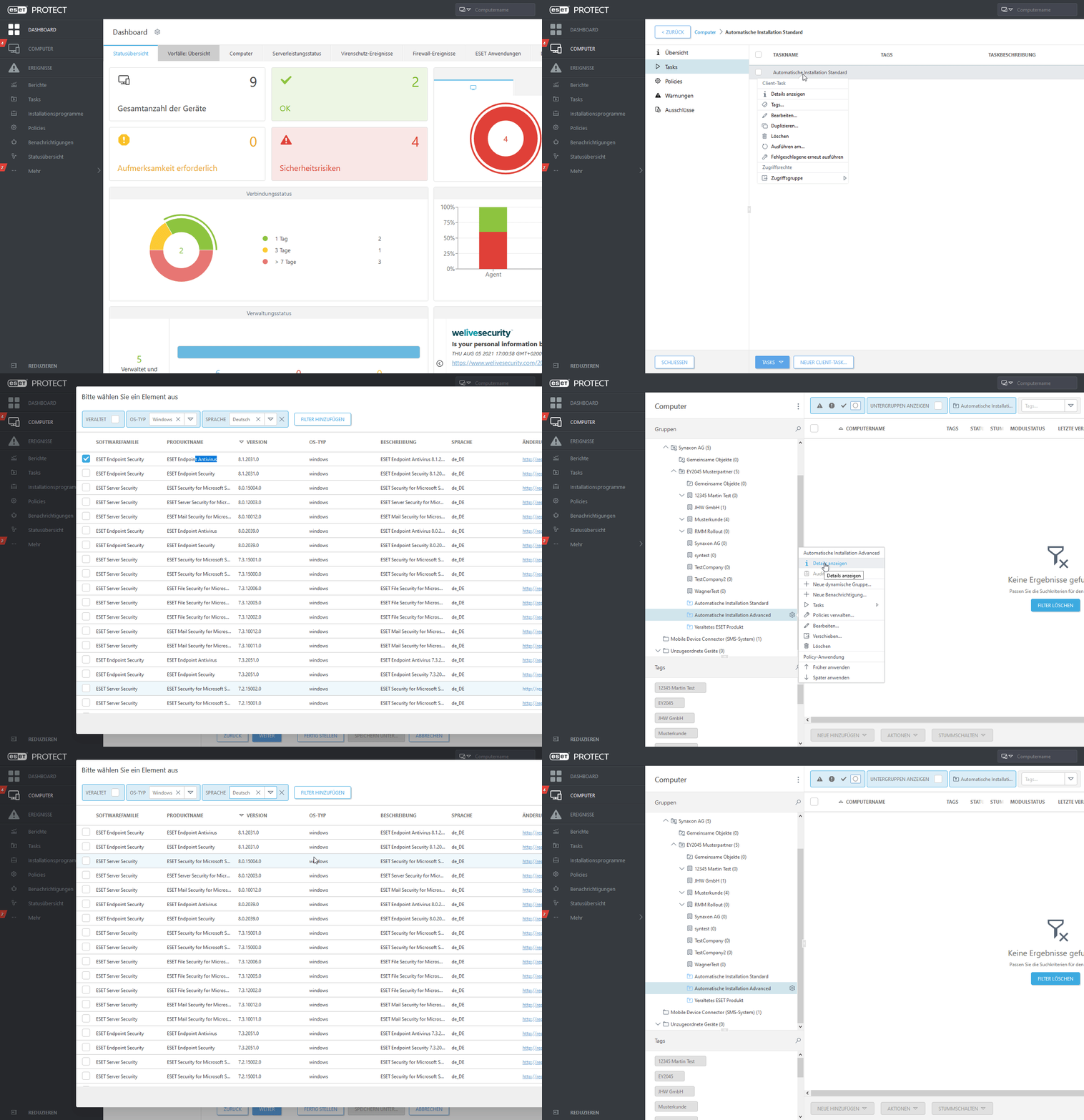
Your current settings specify that the desired security product should be installed in version 8.0. If you wish to adjust this template so that version 8.1 is installed automatically, you must follow these steps in the ESET dashboard (eset.synaxon.de) carry out:
- In the computer section, navigate to the "Automatic Installation Standard" folder -> gear icon -> Show details
- On the left side of the task pane, edit the task (usually "Installation ESET Standard").
- In the settings, click on the font of the package to be installed and select the latest "ESET Endpoint Antivirus" version (8.1.2031.0).
Tip: You can filter by operating system and language. The "Version" column allows you to sort the versions in reverse descending order. - Remove the automatically installed ESET license
- Accept the license and privacy terms
- Finish
To briefly illustrate the individual steps again, Marvin has prepared a small GIF.